

[Editor's Note: This article originally appeared in the April 2012 issue of Grassroots Motorsports.]
Story by Matt Smith
In the old days, gearheads designed parts by carving them out of rocks. Okay, not really, but the process was relatively laborious: sketch design, buy supplies, build mock-up, test fit, throw mock-up against wall, start over and repeat until finally coming up with the right component for the job.
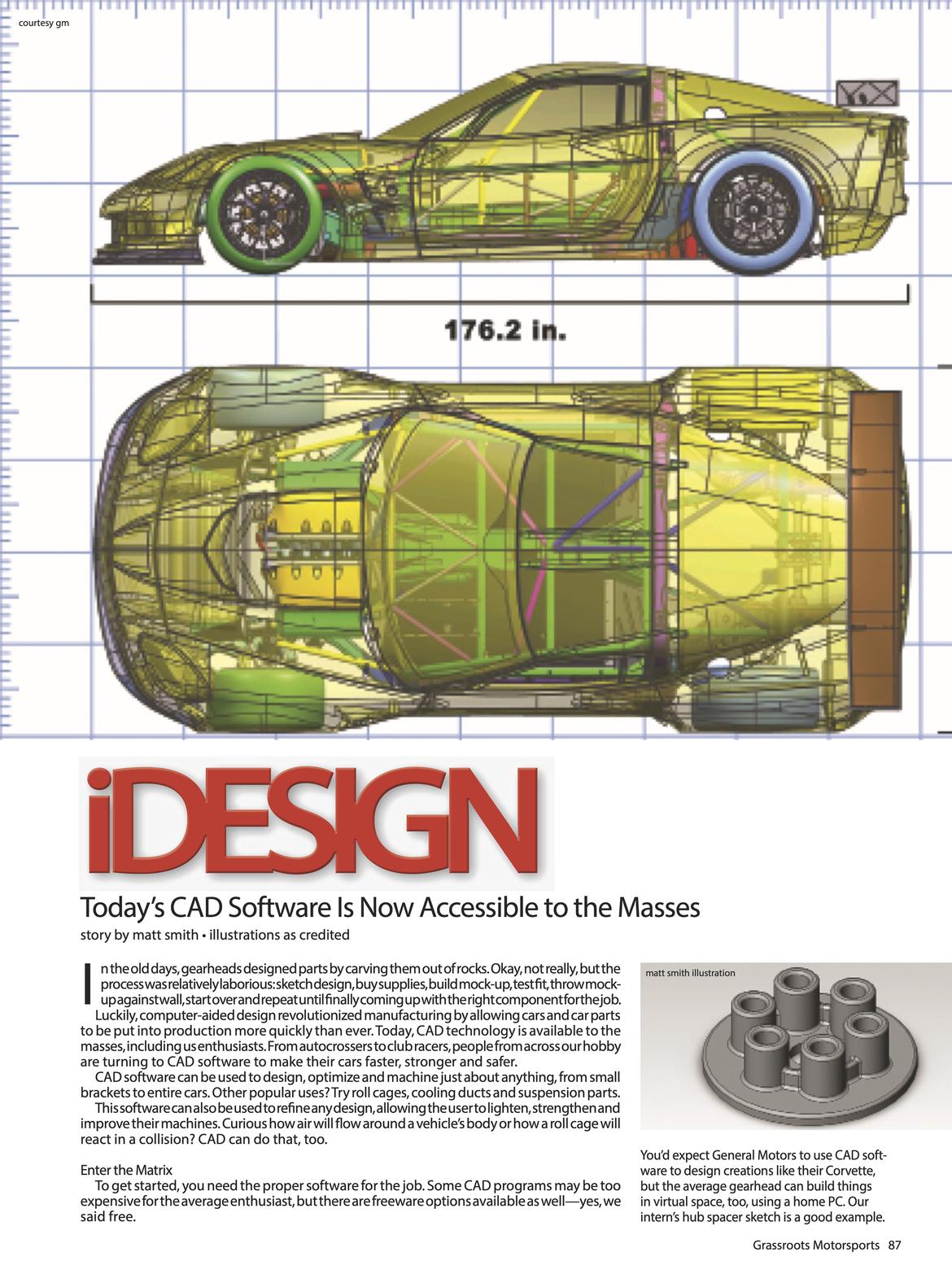
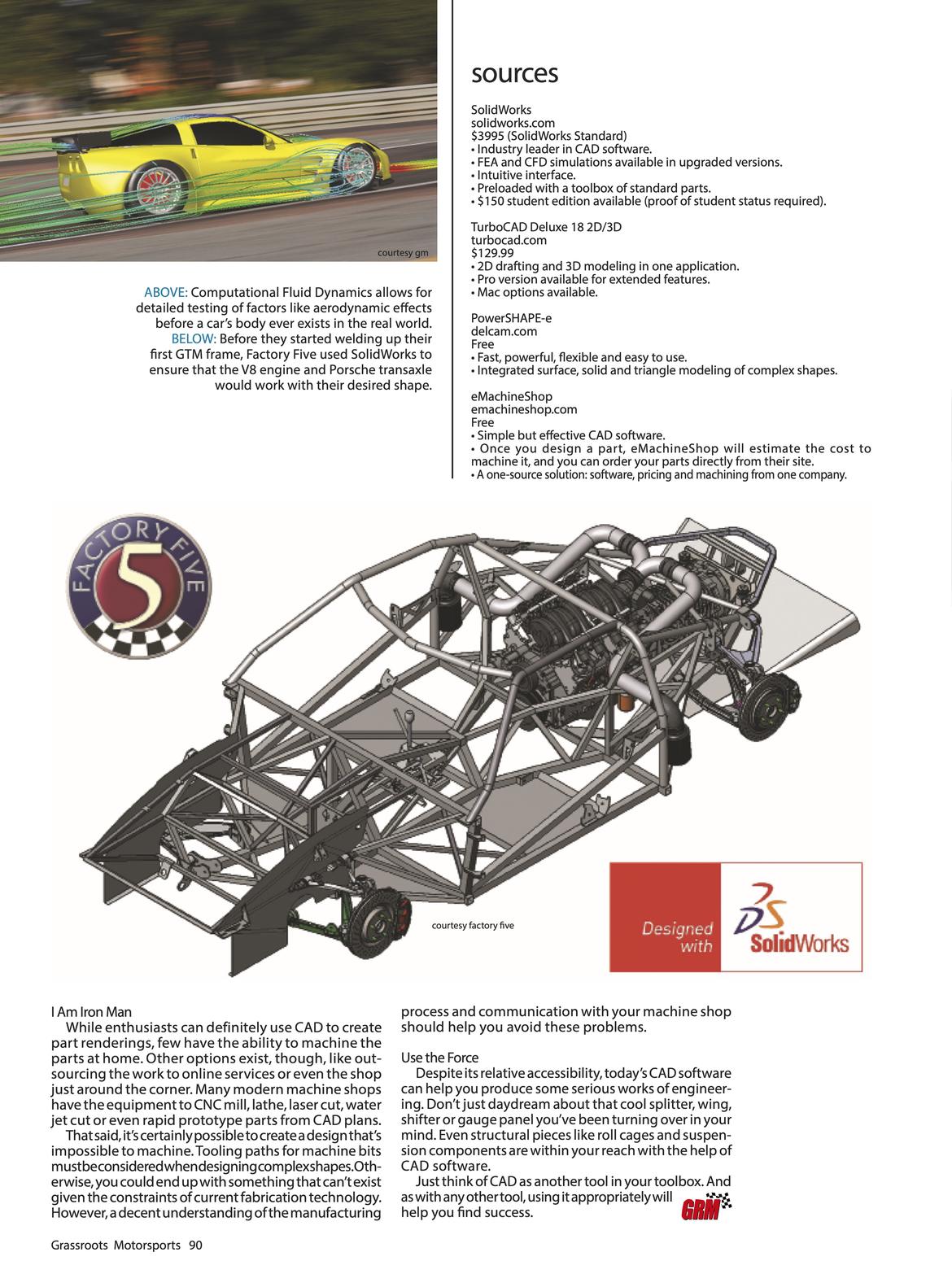
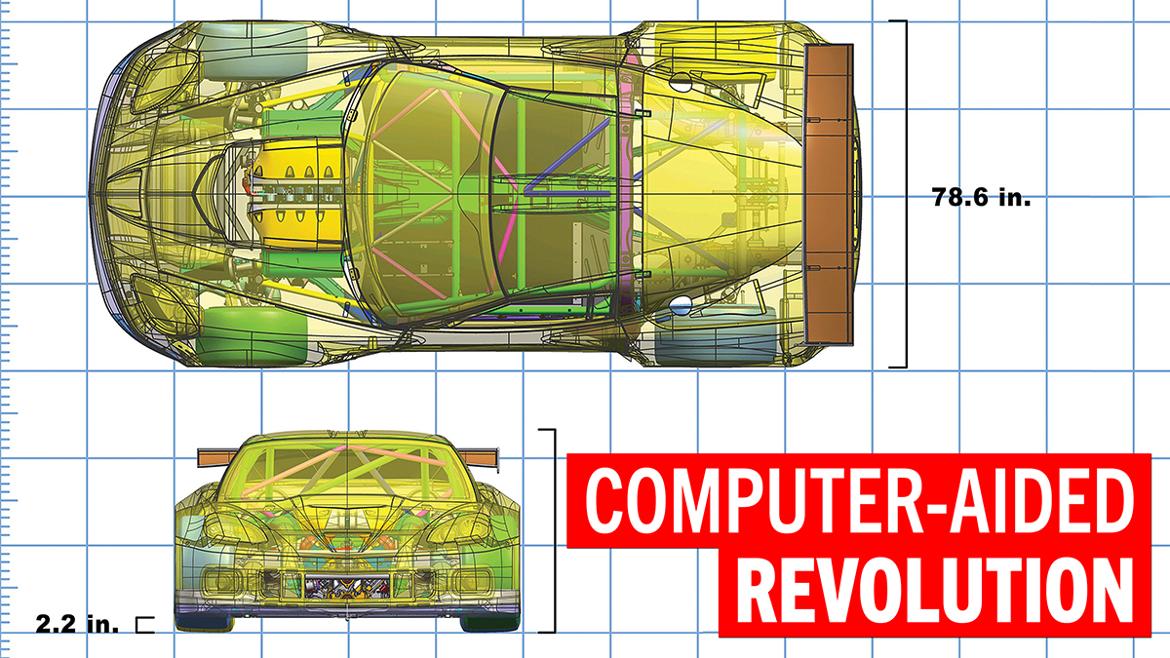
Luckily, computer-aided design revolutionized manufacturing by allowing cars and car parts to be put into production more quickly than ever. Today, CAD technology is available to the masses, including us enthusiasts. From autocrossers to club racers, people from across our hobby are turning to CAD software to make their cars faster, stronger and safer.
CAD software can be used to design, optimize and machine just about anything, from small brackets to entire cars. Other popular uses? Try roll cages, cooling ducts and suspension parts.
This software can also be used to refine any design, allowing the user to lighten, strengthen and improve their machines. Curious how air will flow around a vehicle’s body or how a roll cage will react in a collision? CAD can do that, too.
To get started, you need the proper software for the job. Some CAD programs may be too expensive for the average enthusiast, but there are freeware options available as well—yes, we said free.
Most home computers can run CAD software. Even ancient PCs with low-end graphics cards can run the simpler CAD programs now available. However, running certain tests requires a bit of computing power to crunch through all that data.
The engineering industry has generally catered to Windows-based computers, but software for Mac operating systems is available as well—although those programs could be considered scarce. And for those tech nerds out there, you can even find some programs for the Linux-based operating system.
Once you’ve selected a computer and software suite, you must learn how to craft shapes in a three-dimensional virtual world. This is tough work, as you really have to understand how the software functions. However, completing some basic tutorials is the fast track to familiarity.
Though the learning curve is steep, there are numerous benefits to mastering CAD software. At the top of the list is the fact that it’s the single easiest way to create and design in 3D space. For example, a roll cage can be completely designed, pipe by pipe, in the virtual world. Imagine the headaches you’d avoid by being able to see a finished cage before cutting a single piece of tubing.
Using the same CAD software, you can then print out two-dimensional drawings of each piece of the cage. The drawings will provide the correct lengths, angles and notches, and they’ll even tell you exactly how many feet of tubing you’ll need to purchase for the job. This information will undoubtedly save time and money, as it removes the stage of trial and error altogether.
CAD design isn’t limited to metal parts, either. It can be used for projects constructed out of wood, fiberglass, plastics and more. It’s also not limited to machine design, as this software works well for mapping out electrical circuits and wire harnesses. The possibilities are vast.
CAD software can be used to create any part you can dream up, even complex assemblies like transmissions and differentials. Some software offers an animation feature that allows you to see the part in motion, and numerous tests can be run once the part has been constructed in virtual space.
While usually reserved for the more expensive software suites, tests such as finite element analysis or computational fluid dynamics flow analyzers are incredibly useful tools that can be used to maximize the performance of a car.
Finite element analysis is a very complicated method of simulating stress on parts in the virtual world. For example, you can stress test a roll cage created in CAD software by applying a virtual force to it and seeing what areas of the design are the weakest. Data from a simulated crash could reveal the problem areas of a poor design, allowing for critical improvements before welding has even begun.
Computational fluid dynamics flow analysis, on the other hand, simulates the movement of fluids like air and water around a shape or body. This gives the designer the ability to visualize airflow around a car or a wing element, and it can be a huge advantage for the enthusiast who doesn’t have access to a wind tunnel.
CFD analysis can also model how air passes through an engine. You can design an intake manifold and observe the airflow before you even touch a piece of aluminum.
While enthusiasts can definitely use CAD to create part renderings, few have the ability to machine the parts at home. Other options exist, though, like outsourcing the work to online services or even the shop just around the corner. Many modern machine shops have the equipment to CNC mill, lathe, laser cut, water jet cut or even rapid prototype parts from CAD plans.
That said, it’s certainly possible to create a design that’s impossible to machine. Tooling paths for machine bits must be considered when designing complex shapes. Otherwise, you could end up with something that can’t exist given the constraints of current fabrication technology. However, a decent understanding of the manufacturing process and communication with your machine shop should help you avoid these problems.
Despite its relative accessibility, today’s CAD software can help you produce some serious works of engineering. Don’t just daydream about that cool splitter, wing, shifter or gauge panel you’ve been turning over in your mind. Even structural pieces like roll cages and suspension components are within your reach with the help of CAD software.
Just think of CAD as another tool in your toolbox. And as with any other tool, using it appropriately will help you find success.

Since I use CAD every day at work, I actually prefer coming home and carving my car parts out of rocks. Less screen time, more cave man time.

A couple of other free CAD options to check out are LibreCAD (kind of similar to DraftSight), FreeCAD (more like AutoCAD or Solidworks) and OpenSCAD (a weird but interesting one with an old-school programmatic interface).
For CFD work, check out JavaFoil and OpenFOAM:

In reply to GameboyRMH :
It's pretty cool that there are free options out there.

One software to look at, at a modest price point is Fusion 360 (autodesk product). its got all the solid modeling you need, plus an extensive surfacing features you can model with.
But the nice option is being able to rent out their really sophisticated FEA and CFD modules at single day rates. Not that you can analyze CFD's in a single day (more like a month on a fully blown pc), but the FEA's are less intensive in number crunching.
It also comes with both 3 axis and most 5 axis posts for common nc machines, plus model simulations when doing complex 5x moves. . the cost is about $850 CDN subscription.
Mastercam is about $15K plus about $1500 maintenance fees per yr.
So I have moved over to Fusion 360.
Yes I could use free software, but with all the features that I need to make models and nc programs, fusion 360 for the moment is one nice app.
another honorable mention is rhinoceros or rhino 8.0. affordable plus they have a suite of modules are a cheap.

I taught my students Inventor, then switched to Fusion360. At the time, Fusion was WAY more intuitive. I have not gone back to Inventor. Fusion does absolutely everything I need and more.
Fusion360 is free to the general public.
And you can teach it to yourself with my FREE curriculum: https://www.gwellwood.com/subjects/drafting/
If you can do Inventor, or Pro/E, or Creo, or SolidWorks, you can totally do Fusion.

I've always wanted to design and build my own super car, but first you need to start with the suspension and steering which I don't know how to design and I can't find the geometry anywhere on the interweb to copy a C5 or newer Corvette or road course Late Model stock car, so, here I sit. I could easily just make up something that looks good, but why bother?
VolvoHeretic said:I've always wanted to design and build my own super car, but first you need to start with the suspension and steering which I don't know how to design and I can't find the geometry anywhere on the interweb to copy a C5 or newer Corvette or road course Late Model stock car, so, here I sit. I could easily just make up something that looks good, but why bother?
There are books. I have many. I like books.
There is no "magic recipe," but there are guidelines that get you in the ballpark. Packaging will drive a lot of it.
And you will want to start with the wheels first - a lot of the ideal geometry is compromised by trying to fit it all and brakes inside a wheel.

Fusion is almost exactly like Inventor with cloud based file storage. There are a few minor differences, but most of the tools work the same.
OpenSCAD looks like it might be useful for some specialty purposes like a website that allows nearly infinite customization of a part. But it takes a very different CAD mentality to try viewing a part as a program.
FreeCAD's main points are that it's free even for commercial use, and that it's not OpenSCAD. But it's very buggy and it's easy to break a model if you don't stick to weird, obscure rules that you won't encounter in a commercial CAD program. Version 1.0 has brought the bugginess level down to a hoard of locusts; previous versions had bugs big enough to star in their own kaiju movie.
Thanks guys for the info and links, lots to investigate. I definetly don't want to reinvent the wheel, at least as far as the front suspension is concerned. The rear suspension will have to be custom in order to use Olds Toronado front spindles that are short in height and will fit inside the super negative offset inner dually wheels.
The nice thing about a clean sheet custom car is that I can make it as wide as nessessary. One of these days I need to draw up the cage and frame I'm dreaming up and give it to my old structural engineer and have him run it in his stress analysis program to check suspension input stresses and mayby various directional stresses to check for weak spots during a crash.
Displaying 1-9 of 9 commentsView all comments on the GRM forums
You'll need to log in to post.